
en:support:drucken:drucken_vom_eigenen_pc_linux
This is an old revision of the document!
Table of Contents
Printing from your own computer (Ubuntu)
(tested with Ubuntu 11.04, 11.10)
To print with Ubuntu with the studIT printers, a few steps are necessary:
A short instruction
- Via VPN-Client and Goemobile (or another network) authentification.
- Connect printer via CUPS Webinterface at http://localhost:631 through the printserver print-win.student.uni-goettingen.de .
- Download PaperCut Linuxclient from smb://print-win.student.uni-goettingen.de/Install/Client_Nutzer/ and start it (Startscript has to be made achievable).*
Instruction
Networkauthentification
To log in into the university network per VPN-Client. It is important that the user is flawlessly identifiable.
CUPS - Drucker einrichten
Per CUPS eine Verbindung zum SambaServer aufbauen. Entsprechende Pakete für CUPS oder Samba müssen uU erst aus den Paketquellen installiert werden (“sudo apt-get install smbclient cups cups-client”).
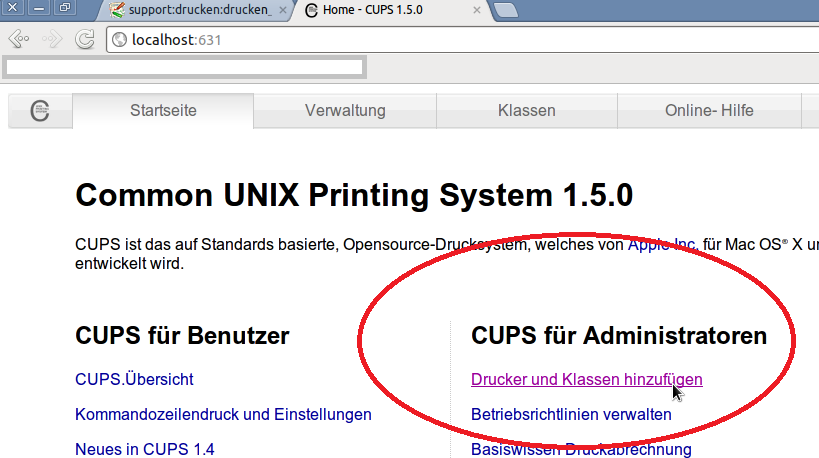
Die Adresse für die CUPS Weboberfläche zum Einrichten des Druckers ist http://localhost:631
In der CUPS Oberfläche Drucker und Klassen hinzufügen auswählen
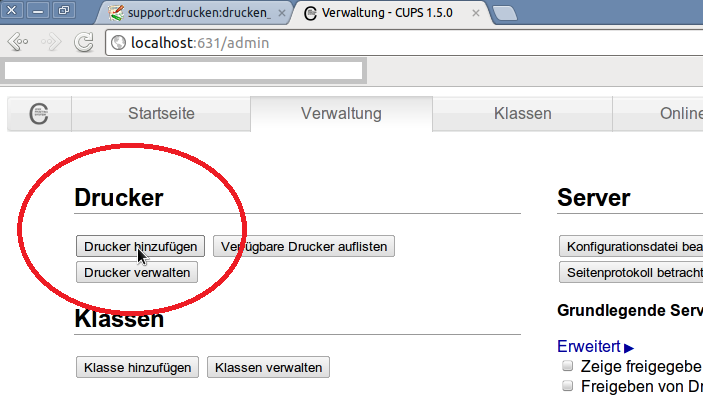
Dort Drucker hinzufügen
| erstellt von | Sandra Klein |
|---|---|
| erstellt am | 28.02.2012 13:24 |
en/support/drucken/drucken_vom_eigenen_pc_linux.1330433073.txt.gz · Last modified: 18.01.2023 11:43 (external edit)